Invoice Management
Turned manual drayage billing into automatic invoices.
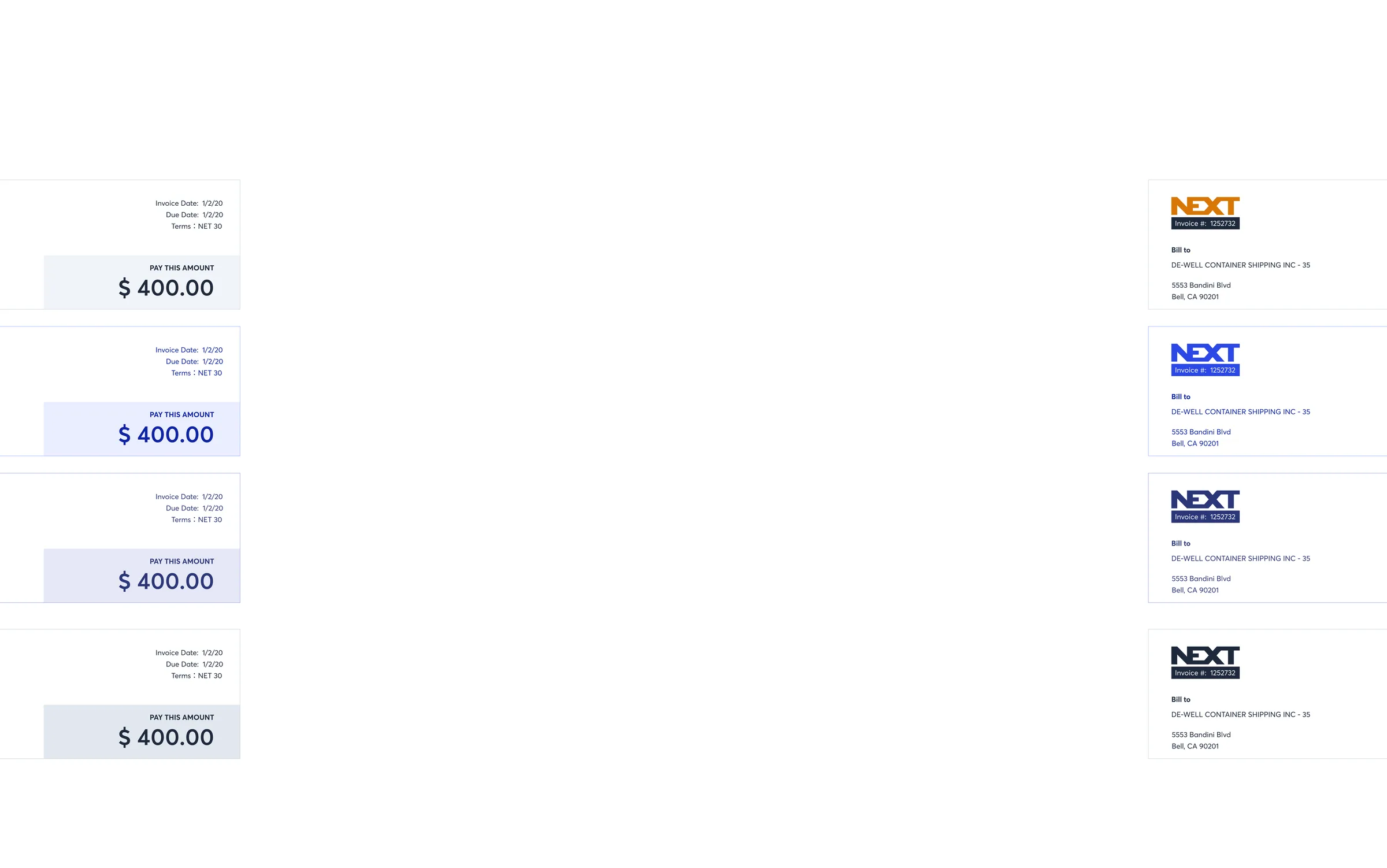
With its complex network of shipments, clients, and various stakeholders, the drayage industry's billing practices are very manual and time-consuming. Delays in processing invoices and failures to meet customer's billing requirements can lead to disruptions in cash flow and operational inefficiencies. To address these pain points, my UX design initiative focused on creating a product solution that enhances the speed, accuracy, and overall user experience in the invoicing workflow.
The Team
- Product Manager
- Product Designer
- Engineering Team
- Accounting Team
My Role
- Interviewed stakeholders and researched the existing billing tools Analyzed the existing business workflows
- Designed an improved/automated user experience
- Aligned with the project manager & stakeholders on the project
- Time Study/User Tests
Time Spent
- 12 months
- Year of 2020 ~ 2021
Product Goal
- M1 - Deprecate 3rd-party Tool by building our NEXT TMS accounting capabilities
- M2 - Auto - Consolidated Invoice and UX Enhancement
Background Knowledge
Split / Consolidated Invoice
Customers (shippers) have different billing preferences.
- Some may want to receive separate invoices per shipment based on item types
- Some may want to receive separate invoices per shipment based on shipment stages
- Some may want to receive invoices in a specific frequency (i.e. once a week)
- Some may want the billing items to be grouped by different logic
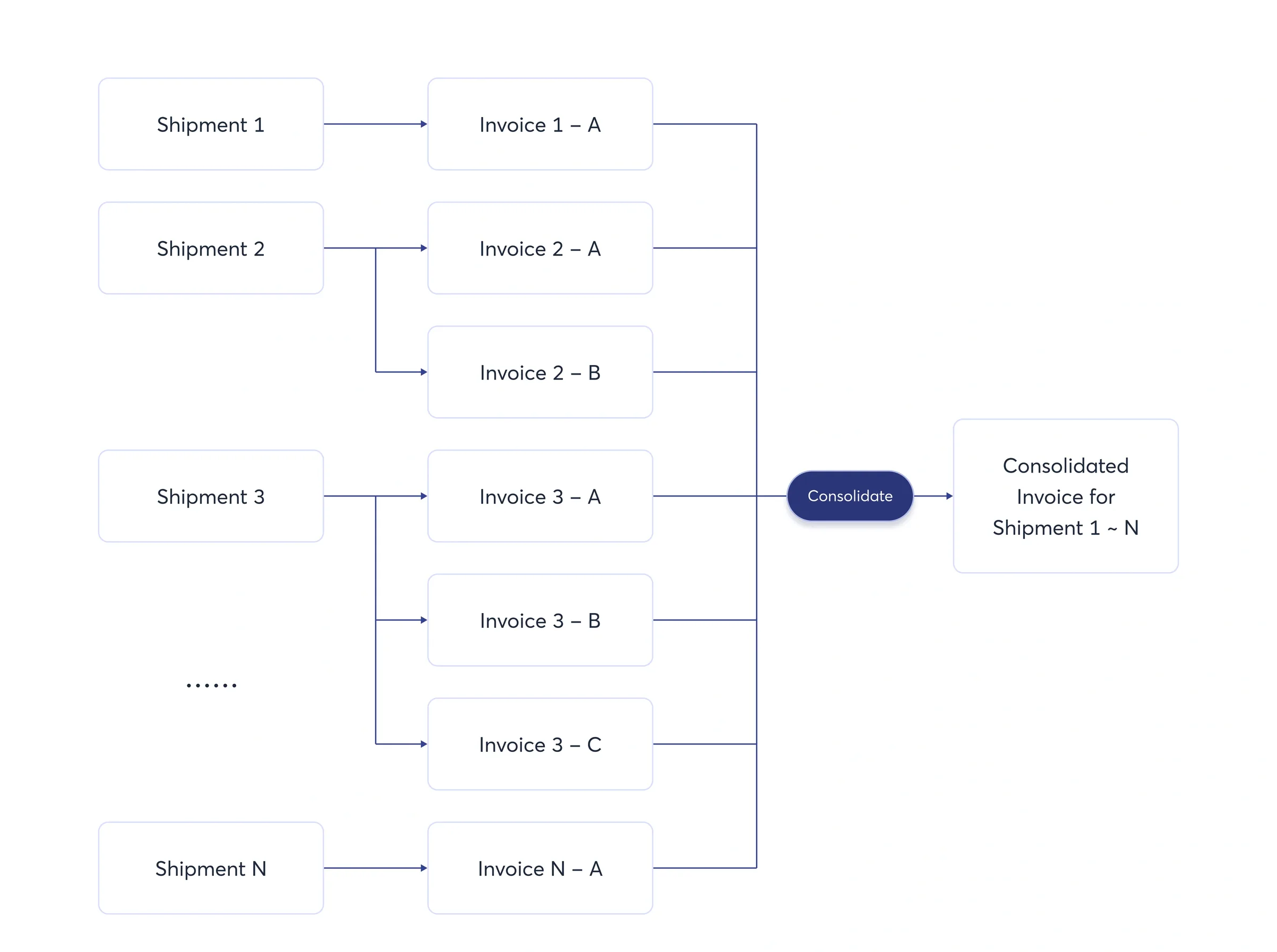
* One shipment can have multiple split invoices
* Invoices from different shipments can be consolidated into a single invoice.
Challenges

Existing workflow to consolidate an invoice is manual and repetitive

Invoice data is not flowing into our TMS

Results in billing inaccuracy and exceptions.

Know the User - Biller
Their job is to review the billing items, split/consolidate billing items into different invoices and send out these invoices to the correct bill-to parties.
Current Tool Research
I worked with the billers via shadowing & interviews to fully understand how they are managing invoicing with the existing 3rd-party tool as our own TMS didn't have the capability at that time.
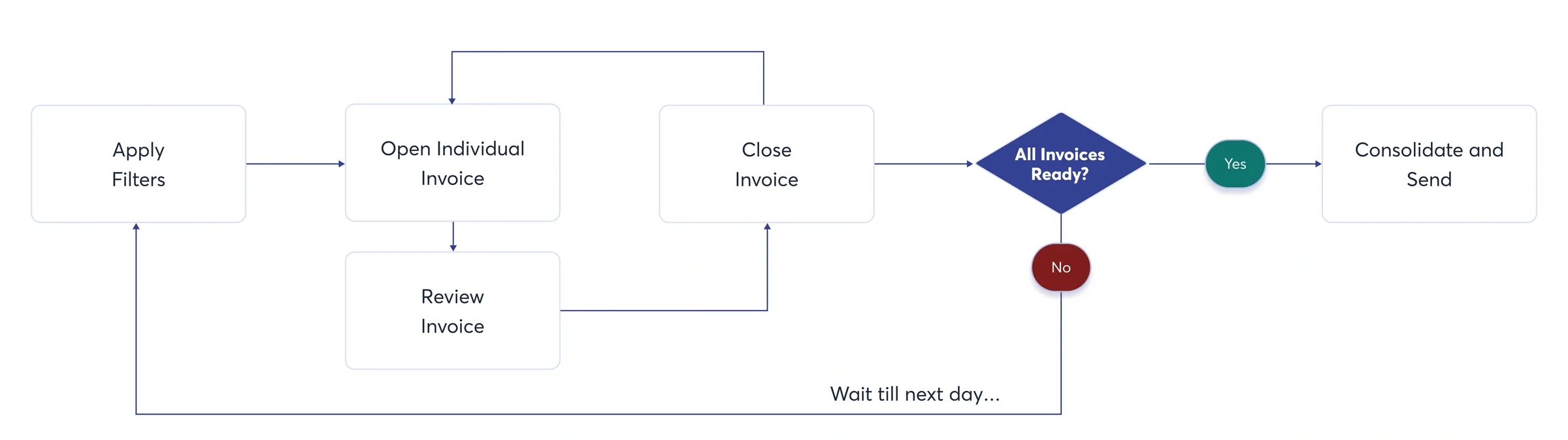
In addition to basic billing functionalities, I'm also trying to improve biller's invoicing experience. After having a couple sessions with the billers, I found that one of the biggest pain points is that it is very tedious and time-consuming to do consolidated billing, which is an essential task to meet customer's billing requirements. Here are some key problems they are facing daily:
- Consolidated billing are being done in a manual fashion
- Filters need to be applied multiple times to find invoices to be consolidated
- Can't mark an invoice as reviewed, which results in duplicate work
Milestone 1
Scoping MVP
Our main goal is to deprecate the 3rd-party tool. The MVP scope will definetly include the basic foundation of the accounting application to allows user to review and send invoice.
However, after analyzing the existing product workflow, I believe that 3 additional features will greatly enhance the user efficiency:
1. Open invoices in bulk
2. Mark individual invoice as "Reviewed"
3. Visual clue that tells the user that which invoice has been reviewed
As the scope of these 3 features are small enough, I worked with PM to include these in the MVP.
Time Study
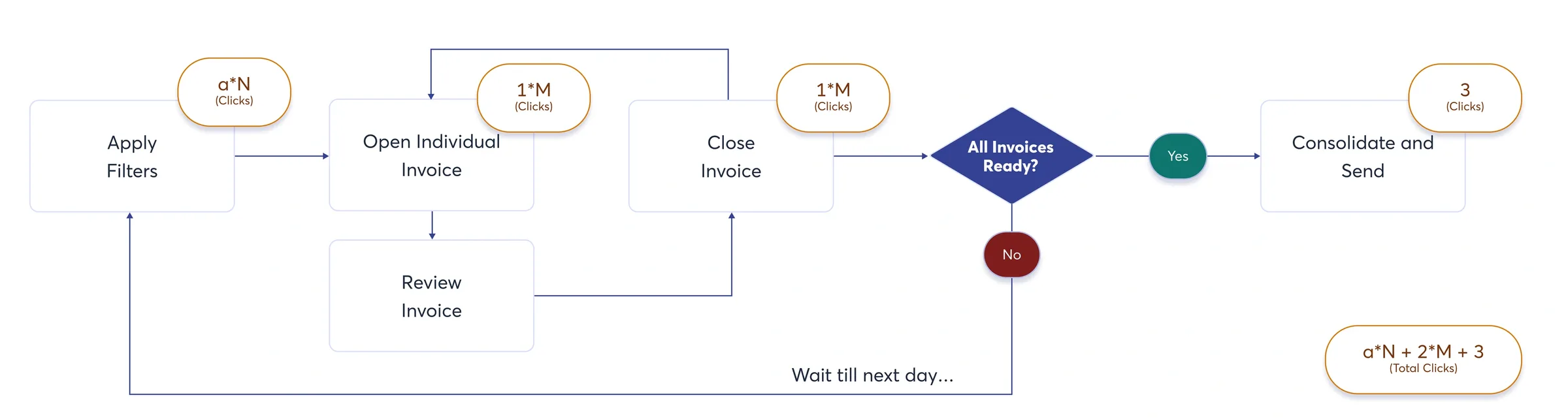
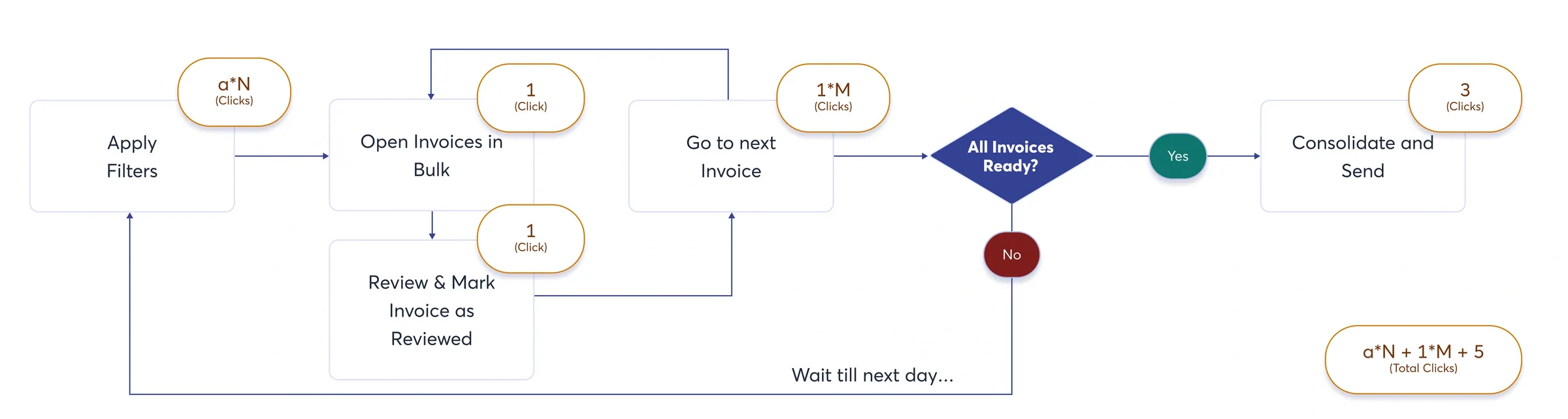
a = The amount of the clicks to apply filters to get the short list of individual invoices for certain shipper. The number could be different depending on the shipper's billing requirement.
N = How many times that the biller has to check the list of individual invoice before finalizing.
M = The total amount of the individual invoice.
With the help of the formula, we concluded that the new workflow will reduce the amount of clicks for billers.
Demo
Basic Capabilities:
- A place to display all invoices and essential infomation
- Essential filters
- Edit and add invoice line items
- Send out invoices
Enhanced Capabilities (compare with the old tool):
- Bulk open invoices
- Mark invoice as reviewed
Stake Holder Feedback

Biller (Direct User)
"The billing feature in ATLAS (Internal TMS) is better looking than the old one. It is straight forward and easy to use. The only thing that's missing is the shipment info, it's not visible on the invoice page so I have to jump to another page."

Director of Accounting
"I am glad that we finally get the accounting capability built in our own system, our team don't have to jump between different platforms to do their work now.

Analyst
"We are able to track out all the revenue and cost in our own system and this helps us to better manage our profit and cash flow, great move!"
Data • Before & After
| Task | Before | After | Enhancement |
|---|---|---|---|
| Send out Consolidated Invoice | a*N + 2*M + 3 clicks | a*N + 1*M + 5 clicks | When M > 2 [1], the new UX saves {M-2} clicks per consolidated invoice |
[1] In most cases, M > 2 because a consolidated invoice contains more than 2 invoices.
Milestone 2
Retrospective
Although the MVP has successfully enhanced user efficiency, the billers are still spending a lot of time processing consolidated invoices. For example, they still have to go through the tedious part ---- "applying filters again and again". I worked with PM to seek for possibilities to simplify the repetitive process of invoice consolidation. After serval discovery sessions on the consolidation rules (billing requirements of our major shippers), we found that there's potential to automatically consolidate invoices without having users to apply filters and manually create one.
Invoice Consolidation Rules
1: Group by MBOL #
- Some customers may want to receive one consolidated invoice based on MBOL #, which in general represents all containers that are shipped in one batch from the original port.
2: Group by Invoice Status
- Some customers may only wish to get one invoice each week. This rule helps our biller to automatically put everything that's ready to invoice into one bucket and send out to the customer in their desired cadence.
3: Group by Reference Number
- Similar to MBOL #, the reference number is usually the customer's purchase order number. This rule helps the shipper to match the invoice easily against their internal system using the same reference number.
Further Simplify Consolidated Invoice Review Workflow
With the invoice auto-consolidation, we can remove the "apply filter" from the workflow. Once the invoice consolidation preference is set up, invoices will be consolidated automatically based on rules.
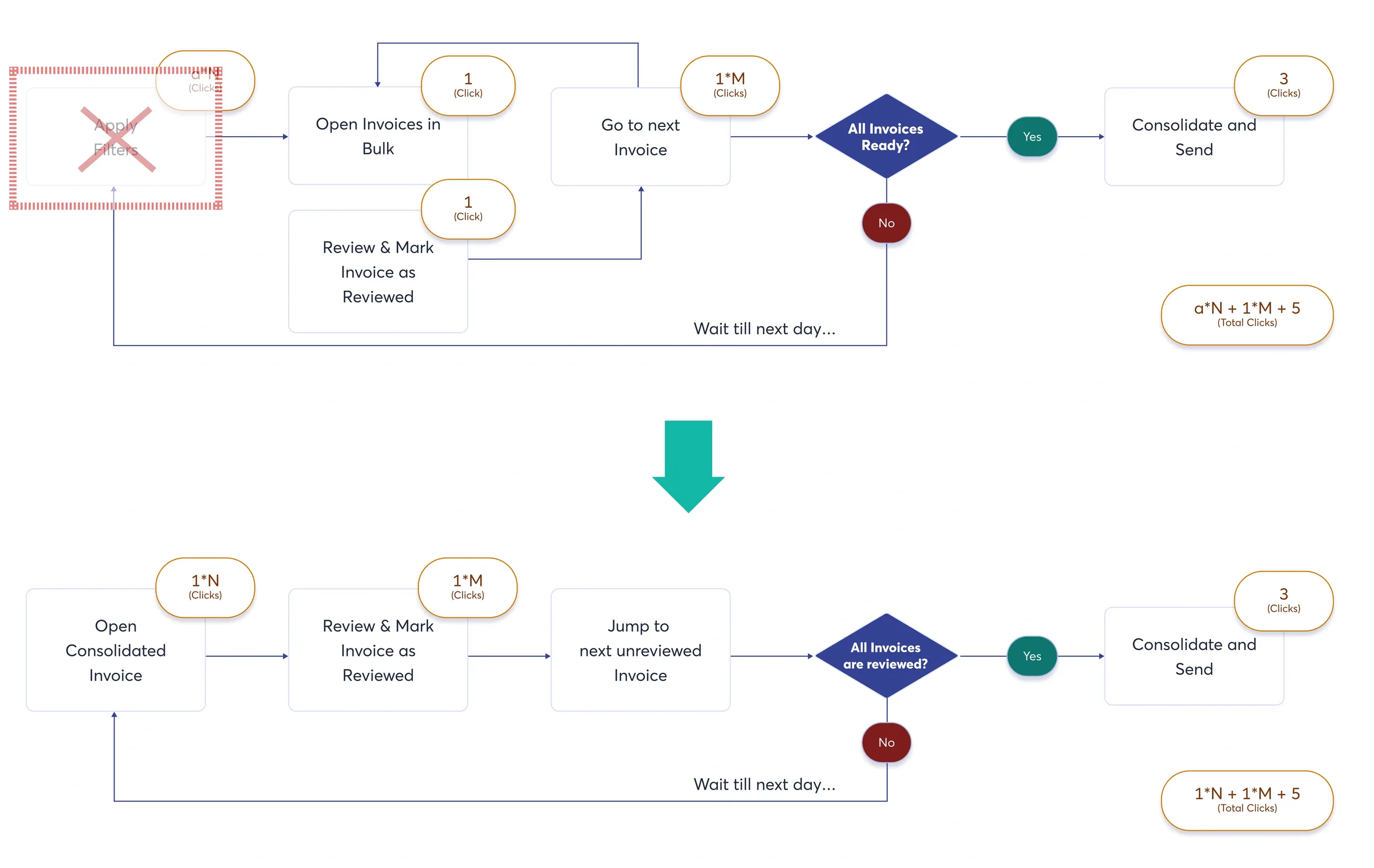
We added a separate table list for consolidated invoice, where users can see how many individual invoice in the consolidated invoice are still waiting to be reviewed. As one consolidated invoice might be linked to multiple shipments, which might be in different stages, the billers need to know weather everything is ready/reviewed in a consolidated invoice before they finalize it. The list allows the user to review the individual invoice/shipments they complete, forget about it once reviewed, and then pick it up later.
We also added a info section called "Billing Assistant"on the right hand side, it gives biller the ability to see all the shipment detail without jumping to the shipment page, which greatly increase the their efficiency and accuracy when reviewing.
- "The auto-consolidation saves so much time and I LOVE the billing assistant."
"With the new automation features, the team has improve their productivity a lot.
Data • Before & After
| Task | Before | After | Enhancement |
|---|---|---|---|
| Send out Consolidated Invoice | a*N + 1*M + 5 clicks | 1*N + 1*M + 5 clicks | Saves {a-1} clicks per consolidated invoice [1] |
[1] In most cases, a > 5.